
Our posts on password security span the entire period of our (Retailing A to Z) existence. In each case, our goal is for you to build stronger passwords NOW. Today’s post is a MUST READ.
Old Rules to Build Stronger Passwords
For years, experts (including us) have stressed these “rules” for strong passwords. Many of them still make sense. Yet, further password security is needed!
Aside: Too few of YOU even use these tips.
Evans on Marketing: Tips for Behaving Safely Online (2012) — “What makes a good password. (a) Don’t use your name or combinations of it. (b) Use at least 6 to 8 characters. (c) Include at least one letter, number, and symbol. (d) Don’t use one password for all accounts. If one is hacked, then … .”
Microsoft: Create a Strong Password (2017) –“Strong passwords help prevent unauthorized people from accessing files, programs, and more. It should be hard to guess or crack. A good password is at least 8 characters. The password doesn’t contain your user name, real name, or firm name. It is quite different from previous passwords. You use uppercase and lowercase letters, numbers, and symbols. It doesn’t contain a complete word.”
Google Account Help: Creating a Strong Password (2017) — “To keep safe, act on these tips. Use a unique password for each important account. Use a mix of letters, numbers, and symbols. Don’t use personal information or common words. Make sure your backup password options are up-to-date and secure.”
Guidry Consulting: How To Create Strong Passwords (2017) — “Strong passwords must be not in use on any other system. They must be changed regularly. The passwords must be 12 characters or more. They must mix upper- and lowercase letters, numbers, and symbols. The passwords must not be common words or proper nouns. And they must not be names of your spouse, kids, pets, or other personal identifiers.”
Click the image to read more from Guidry Consulting.

Why Old Password Rules Aren’t Enough Today
Look at why old password rules are not enough.
Auth0: Don’t Pass on New NIST Password Guidelines (2017) — “The NIST drafted new rules to protect digital identities, published in June 2017. Substantial changes have been made since the National Institute of Standards and Technology’s 2013 report. Many concern passwords. The NIST advises dropping password complexity rules. It suggests new encryption standards. And it wants multi-factor authentication for sensitive information.”
 Click the image to access NIST SP 800-63-3
According to Auth0, “Conventional wisdom says password complexity is good. But in reality, complex passwords can do harm. Making users’ lives easier ensures stronger passwords. A big problem for users is remembering passwords. So, they make them simple. And they re-use them. In 2016, Experian found Millennials averaged 40 services registered to one E-mail account, and only five distinct passwords. In response, some firms have required a number, or symbol, or capital letter to make passwords harder to decrypt. BUT, an earlier study found users simply capitalized the first letter and added a “1” or “!” to the end. This made the password no harder to crack. Any [decent] password cracker knows these patterns. When required to use numbers, 70% of users on rockyou.com (which contained user info for social networks) added numbers before or after their password.”
Fortune reports that the creator of many old rules has changed his mind (2017) — “The man responsible for the requirement that passwords include letters, numbers, and special characters is walking back that advice. ‘Much of what I did [for the NIST in 2003], I now regret,’ Bill Burr told the Wall Street Journal. He added that the recommendation led to complicated passwords. A re-write of ‘Special Publication 800-63’ now suggests that users create passwords with long, easy-to-remember phrases. And they should not be forced to change passwords as often. “
MUST READ: NEW Rules to Build Stronger Passwords Now
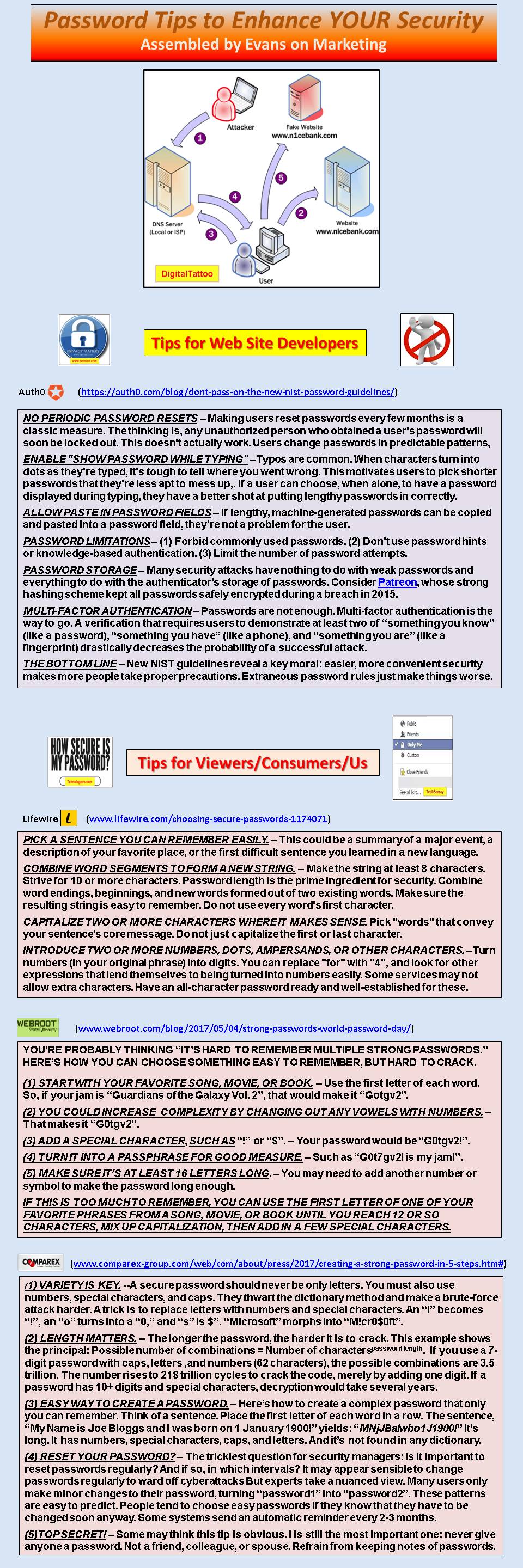
This section has a synopsis of new password advice. It includes an infographic by Evans on Marketing. It ties together tips from various sources.
XeusHack: Choosing a Strong Password in 2017 (2017) — “Password strength is a measure of password effectiveness to resist guessing and brute-force attacks. In its usual form, it estimates how many trials an attacker would need, on average, to guess correctly. The strength of a password depends on length, complexity, and unpredictability. You must learn how passwords work, how possible attacks to break them work, and how to choose a strong password that won’t break.”
Lifewire: 5 Steps to a Good Password (2017) — “There is no such thing as a perfect password. A committed hacker can crack any password, with the right tools. But if the protection is strong enough, the hacker may become discouraged and give up before the protection fails. We suggest a password with 3 qualities. (1) It is neither a proper noun nor a word in the dictionary. (2) It is complex enough that it resists repetition attacks. (3) It is intuitive enough that you can still remember it.”
Click the infographic to see a larger version of our password tips.
MUST READ: Using a Password Manager
What is a password manager? Why should we use one as our best line of defense?
Webroot gives a good overview on this topic:
“How can we create and remember so many unique passwords? The best solution today is a password manager. It offers both convenience and security. Password managers come as lightweight plugins for Web browsers such as Google Chrome or Mozilla Firefox. First passwords are saved in an encrypted database. Second, your credentials are automatically filled in.”
“The major benefit of a password manager is that you need to remember a single master password. This allows you to use unique, strong passwords chosen for each of your online accounts. Just remember one strong password. The manager will take care of the rest.”
Take a look at this video from Vox.
In alphabetical order, these are four popular password managers. NOTE: Both LastPass and KeePass have free versions!


